QA agents for every pull request
Find the break.Open the bug.
Ten simulated users test your preview in real browsers. When something breaks, step into the session and see it for yourself.
For the code you ship. And the bugs you don’t see.
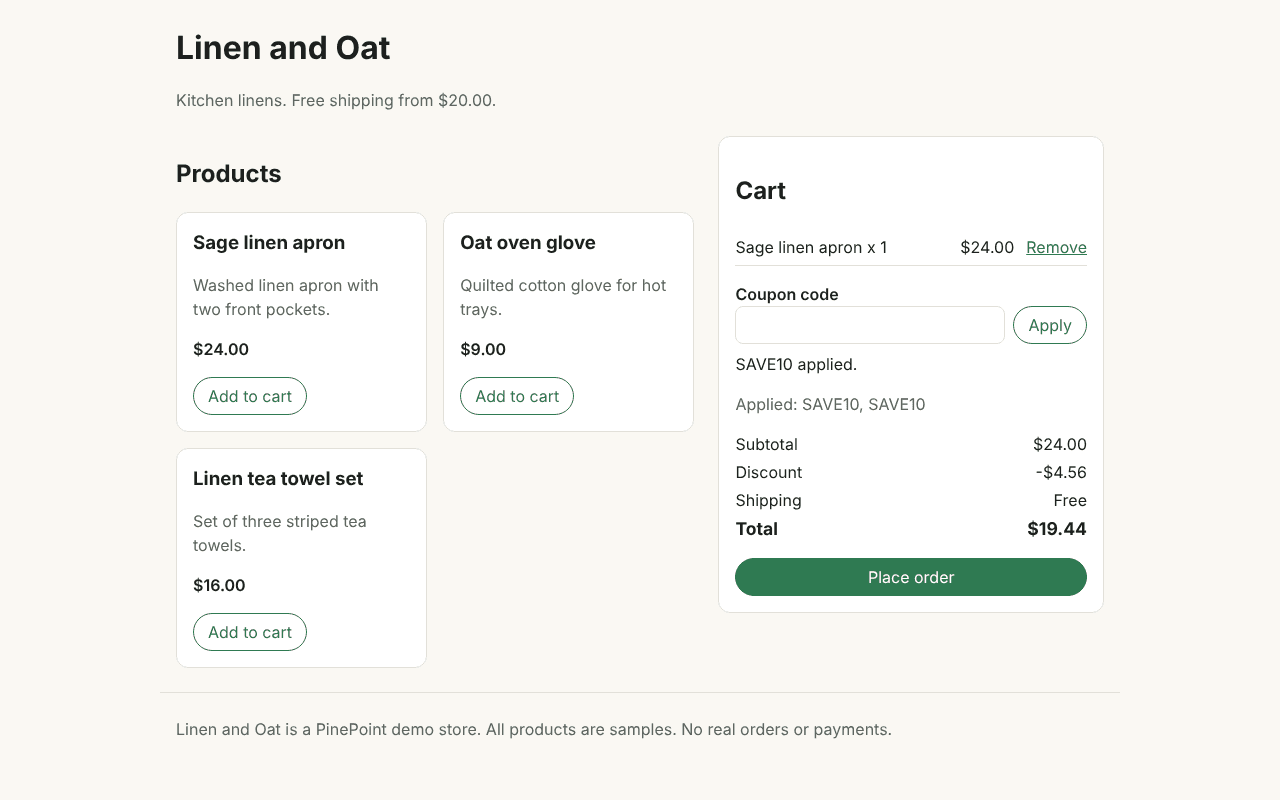
One coupon. Two discounts.
Found by the coupon tester
Interactive example · recorded demo screenshot
A new perspective.
Right in your workflow.
01 / Find the break
One preview.
Ten fresh perspectives.
The first-time buyer. The keyboard user. The person who applies a coupon twice. Different missions find different ways to break your changes.
Coupon repeater / finding
Same coupon. A second discount.
Apply SAVE10 twice. The discount stacks when it should only apply once.
Planned from your diff and qa.md. Tested through Flow, UI, Abuse, Access, and Safety lenses.
02 / Open the bug
The moment it broke.
Ready for a closer look.
Open a retained live session from the finding. Inspect the cart, the inputs, and the browser that found the problem. Take control when you need to.
Explore the sample dashboardSample data · no live run required
SAVE10 applies twice.
Expected $21.60. Saw $19.44.
- Add a sage linen apron.
- Apply SAVE10.
- Apply SAVE10 again.
if (cart.coupons.includes(code)) {
  return { cart, message: "Coupon already applied." };
}Evidence you can inspect.
Screenshots and short steps show what happened. Rechecks help separate bugs from noise.
You make the call.
Mark Bug or Not a bug. PinePoint keeps the decision with the finding and on the PR.
A fix you can review.
Get a proposed code change. Read it, post the suggestion, and commit it when you’re ready.
A few good questions
Before your
first run.
Do I need to write a test suite?
PinePoint reads the PR diff and your qa.md, then plans ten missions for the preview. Each simulated user explores one goal in its own browser. Your existing tests still have their place; PinePoint adds another look at the running product.
How does PinePoint check a finding?
Failed preview missions are checked again and compared with production when applicable. Confirmed bugs, possible issues, and existing production bugs get different labels, so you can see what the evidence actually supports.
Will it change my code?
You make the decision. When you mark a confirmed finding as a bug, PinePoint can propose a fix. You review it and choose whether to post it as a GitHub suggestion. You commit the change yourself.
What can I try today?
The current MVP tests GitHub pull requests with Vercel previews. Start with the sample dashboard or the demo PR to explore the workflow. A dedicated rerun of a failed mission after a fix is still in development.
Your next PR has company
A QA team for
what you ship next.
Real browsers. Clear evidence. Your decision.